 Secure Offline Transcriber
Transcripts and summaries, made on your own computer.
Turn recorded meetings, interviews and calls into time-stamped transcripts in English, French, Cantonese and Mandarin. The speech models run on your computer, so confidential recordings are never uploaded.
Version 2.3.1. Windows: Windows 10 or 11, 64-bit, zip about 159 MB. Mac: macOS 14 or later on Apple silicon (M1 or newer), zip about 151 MB. Free for personal use; commercial use needs a licence.
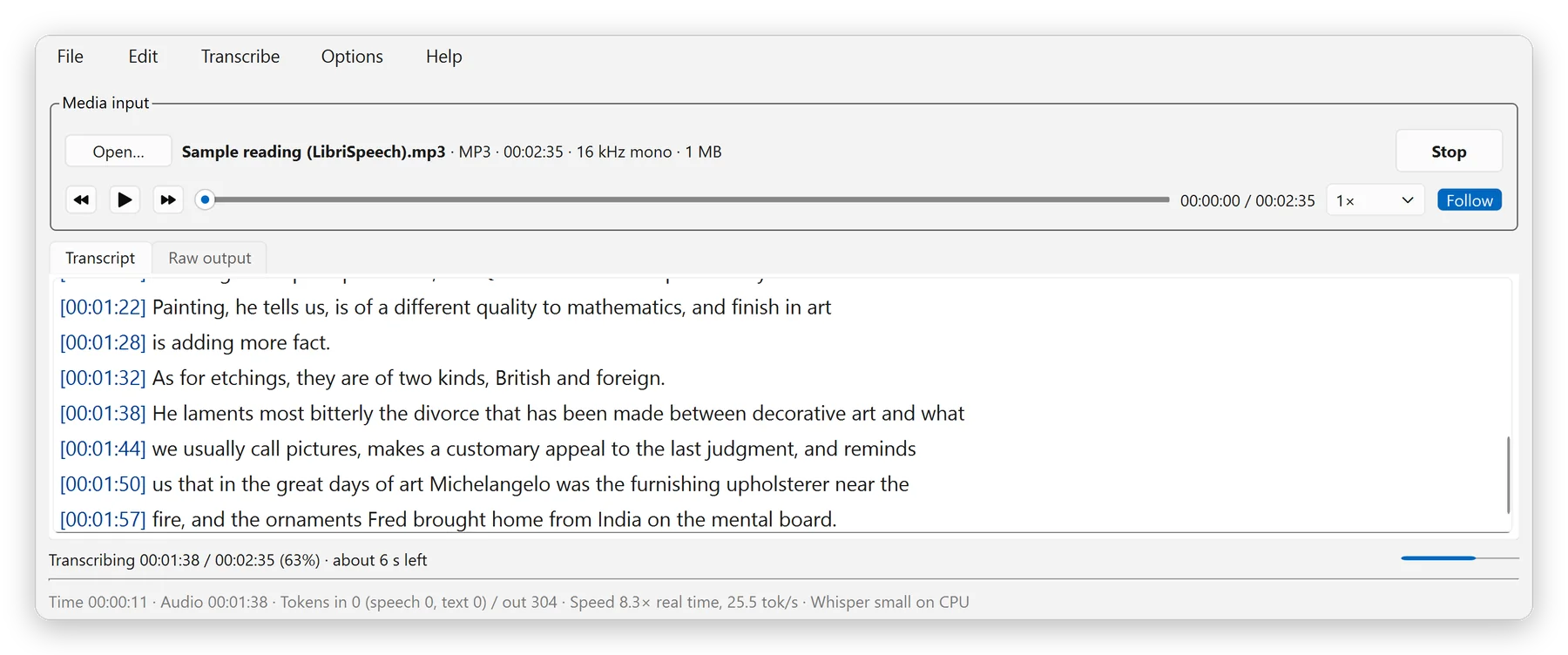
Confidential recordings stay on your computer.
Board meetings, HR interviews and client calls often should not go to an online transcription service. Here, open speech models (Whisper, SenseVoiceSmall, Parakeet, Moonshine) run on your own processor.
- The only internet connection is a model download, when you click Download. Every file is checked against its SHA-256 fingerprint.
- Offline Mode switches on by itself once a model is installed, and blocks every network call.
- No account, analytics, crash reporting or update server. Logs hold file names and timings, never transcript text.
English, French, Cantonese and Mandarin.
Choose the language or let the program detect it. Automatic picks a suitable installed model for each language, such as Whisper or Parakeet for English and French, and SenseVoiceSmall for Cantonese, including Cantonese mixed with English, and Mandarin. Chinese is written in Traditional (Hong Kong or Taiwan) or Simplified characters.
Accuracy depends on the recording: clear audio from a nearby microphone gives the best results.
Check a transcript in a fraction of the time.
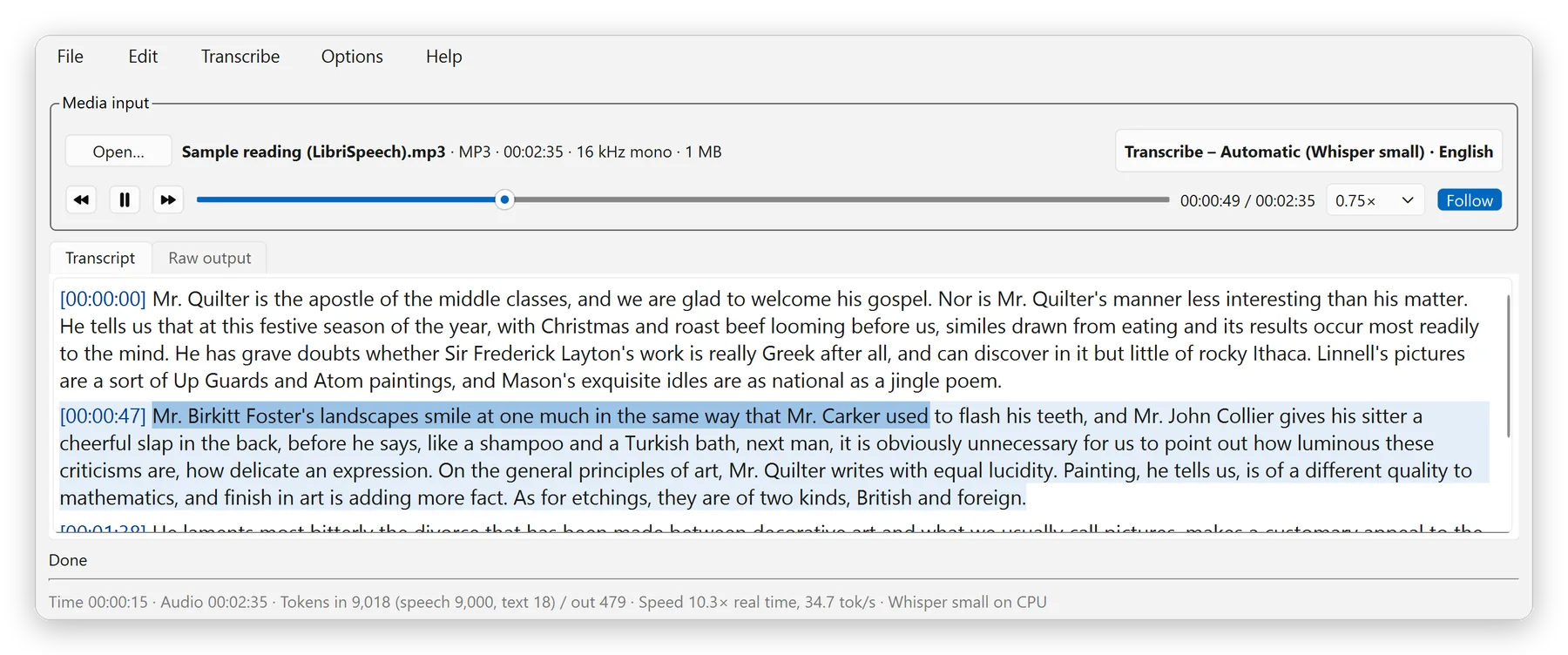
While the audio plays, the paragraph is tinted, the sentence being spoken is highlighted, and the text scrolls with it.
- F6 replays the current sentence; F7 and F8 jump to the lines Whisper was unsure about.
- Ctrl+click any word to hear its sentence. Playback runs at 0.5× to 1.5× with natural pitch.
- Replace fixes a misheard name in the whole transcript, and Add Selection to Vocabulary fixes it in future files too.
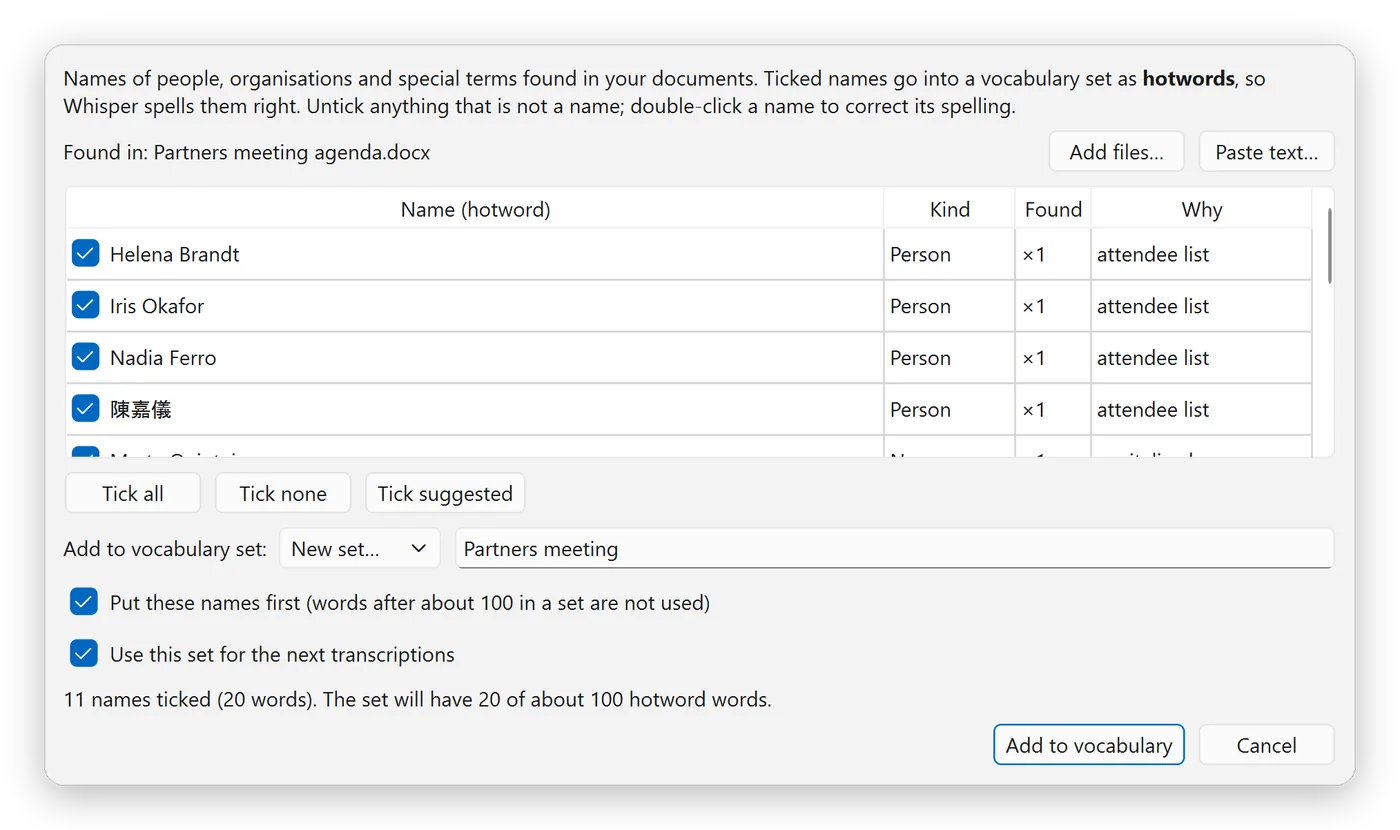
Names from your meeting papers.
Speech models misspell names they have never heard. Open the agenda, attendee list or e-mail for the meeting (Word, Excel, PDF with text, plain text or a saved e-mail) and the program lists the people, organisations and terms in it. Untick anything that is not a name; the rest go to Whisper as hotwords.
Names are found by simple rules on your computer, not by an online service, so check the suggestions.
An AI summary, also written on your computer.
Turn on Options, AI Summary and download one of six small language models (Qwen3, Qwen3.5 or Gemma 4, 1.8 to 5 GB). When a transcript is complete, you get a short summary, key points, decisions, action items and open questions. Each point ends with the time it was discussed, so a click plays that part of the recording.
Small models can get details wrong. Check the summary against the transcript; you can edit it and save it with the transcript.
Also included.
- English in American, British, Canadian, Australian or Hong Kong spelling, chosen from your computer's country or region.
- Stop a long job and resume it later, also after a crash or power cut.
- A queue for several recordings, each saved before the next starts.
- Noise reduction for noisy rooms, with a preview in the player.
- Export to text with times, plain text, Word, SRT and WebVTT subtitles, Markdown, JSON and CSV.
- Models on another drive, a NAS or a USB stick, and model packs for a computer without internet.
Install on Windows.
- Download
SecureOfflineTranscriber-portable-win64.zip. - Right-click the zip, choose Properties, tick Unblock if shown, and click OK.
- Right-click the zip, choose Extract All, and pick a folder you can write to.
- Optional: double-click
verify-files.batto check that every file arrived complete. - Double-click
run.bat, then choose Download recommended set.
Install on a Mac.
Open Terminal and run these lines. Downloading and unzipping in Terminal avoids macOS's warning for programs from the internet.
cd ~
curl -L -o SecureOfflineTranscriber-portable-macos-arm64.zip https://github.com/hylhk23/SecureOfflineTranscriber/releases/latest/download/SecureOfflineTranscriber-portable-macos-arm64.zip
unzip -q SecureOfflineTranscriber-portable-macos-arm64.zip
SecureOfflineTranscriber/run.command
After that, double-click run.command to start it. Full steps, updates and troubleshooting are in the README on GitHub.
Details.
| Version | 2.3.1 |
|---|---|
| Windows | Windows 10 or 11, 64-bit; zip about 159 MB |
| Mac | macOS 14 or later on Apple silicon (M1 or newer); zip about 151 MB |
| First model | Whisper small (486 MB), or Whisper large-v3-turbo (1.6 GB) with 12 GB of memory or more; SenseVoiceSmall (240 MB) for Cantonese or Mandarin |
| Opens | WAV, MP3, M4A, AAC, FLAC, OGG, Opus, WMA, MP4, MKV, MOV, AVI and WebM |
| Transcripts saved to | Documents/SOT Transcripts |
| Internet | Only to download a model, on click |
| Price | Free for personal use; USD 19.99 one-off for commercial use |
Transcribe conversations only with the participants' knowledge and in line with your organisation's policies and local law. Check transcripts against the recording before relying on them.
Need the recording first?
Voice Recorder Pro records both sides of a Zoom or Teams call, ready to transcribe.